Whitepapers & ebooks
Sales and Operations Planning Software: How to Choose It, and When Not To
What you are actually buying when you buy S&OP software, what has to be in place first, and when the honest answer is to wait.
23. september 2026
13 min

Most S&OP processes that fail do so because the executive meeting cannot change the plan, not because the spreadsheet is too slow. Software shortens the preparation and makes scenarios cheap, which is worth a lot once the decisions work, and very little before. This guide covers what you are actually buying, what has to be in place first, and when the honest answer is to wait.
What is S&OP software supposed to fix?
S&OP software fixes two things: the time it takes to prepare a planning cycle and the cost of running a scenario. It does not fix who is allowed to change the plan, who owns the forecast, or the fact that production capacity lives in a shift leader's spreadsheet. If you need a refresher on the cycle itself, our glossary entry on what S&OP is and how the monthly cycle runs covers the demand review, supply review, reconciliation and executive review.
The preparation problem is real. In a typical mid‑size company, a planner spends the first week of the month pulling sales history from the ERP, rolling SKUs up into product families by hand, converting units into revenue with a price list that finance maintains separately, and reconciling three versions of the same file. By the time the executive meeting happens, the numbers on the table are two weeks old and nobody has had time to prepare an alternative. The meeting then does what meetings do with a single, slightly stale option: it approves it, or it argues about the data instead of the decision.
Software can compress that week into a day or two and make a second or third scenario cheap to produce. That is worth money. It is worth money, though, only if the meeting at the end of the cycle has the mandate to choose between those scenarios and the people in it will stick to what they chose.
We saw this at Viscofan, where two plants, one in the Czech Republic and one in Germany, had to hand over semi‑finished casings between production phases. The interval between maturation and shirring came down from 20 days to 9, a 55% reduction, and safety stock between the plants went down with it. What changed was the S&OP process and the information flow between the two sites. The schedules were synchronized and batch changeovers simplified. Nobody bought a planning platform to get there.
Three different things are sold as “S&OP software”
Before comparing vendors, it helps to know that the label covers at least three kinds of product, and that a demo rarely tells you which one you are looking at.
The first is a tool for running the S&OP cycle itself. It aggregates plans from SKU level to product families and capacity groups, reconciles units with money, holds scenarios side by side and records what was decided and why. The second is an integrated business planning platform. It does everything the first category does and adds detailed supply planning, sometimes production scheduling, and a financial plan that runs on the same model. The third is a forecasting engine, which produces the statistical demand baseline the demand review starts from. It is an input to S&OP, not S&OP.
A fourth thing gets sold under the same name more often than it should: a BI dashboard that shows last month's plan against actuals. Visibility is useful. It is not a planning tool, because nothing in it lets you change the plan and see what follows.
Vendors mix these layers freely, so a buying team ends up comparing a forecasting engine with a planning platform and a dashboard, and concluding that one of them is “the most complete”. One question sorts it out: which layer are you missing today? For many mid‑size manufacturers and distributors, the answer is the baseline, because the demand review starts from a sales team's gut feel. That is the layer Veritico STOCK covers, as part of our work on demand forecasting and inventory optimization. The cycle itself (owners, calendar, decision rights, KPI) is something we design with the client, and it can run on several kinds of tool.
Four things that must exist before software pays off
Software multiplies whatever process it is given. When the process works, it makes it faster. When it doesn't, it makes the disagreements more detailed. Four conditions tell you which of the two you will get.
A rhythm that already holds. You have run at least three monthly cycles in a row, in whatever tool, with the same calendar, the same agenda and the same people in the room. If the cycle has never survived a busy month, software will not make it survive one.
One owner of the forecast. One role is accountable for the demand number and has the right to change it. Sales can argue, finance can challenge, but the number has an owner. When the forecast belongs to everyone, a new tool mostly gives each department a faster way to produce its own version.
An agreed planning hierarchy. You know which product families and which capacity groups the plan is decided on. Without that, there is nothing for the software to aggregate, and the implementation turns into a months‑long argument about how to group 1,200 products.
One set of numbers with finance. The plan in units and the plan in money come from the same version. If finance runs its own forecast in parallel, the executive meeting will always have two truths to choose from, and no tool can decide which one is right.
The order matters more than the tool. At AG FOODS Group, a food producer with 215 employees, 1,200 products and two production plants, frequent changes to the production plan were creating extra cost. The work started with mapping how planning actually happened, then aligning production with real demand, and only then rolling out the new process. The outcome was a single, stable plan that production could execute, with clearer roles and fewer expensive last‑minute changes. The tooling followed the process, not the other way round.
Excel, the ERP planning module, or a dedicated platform?
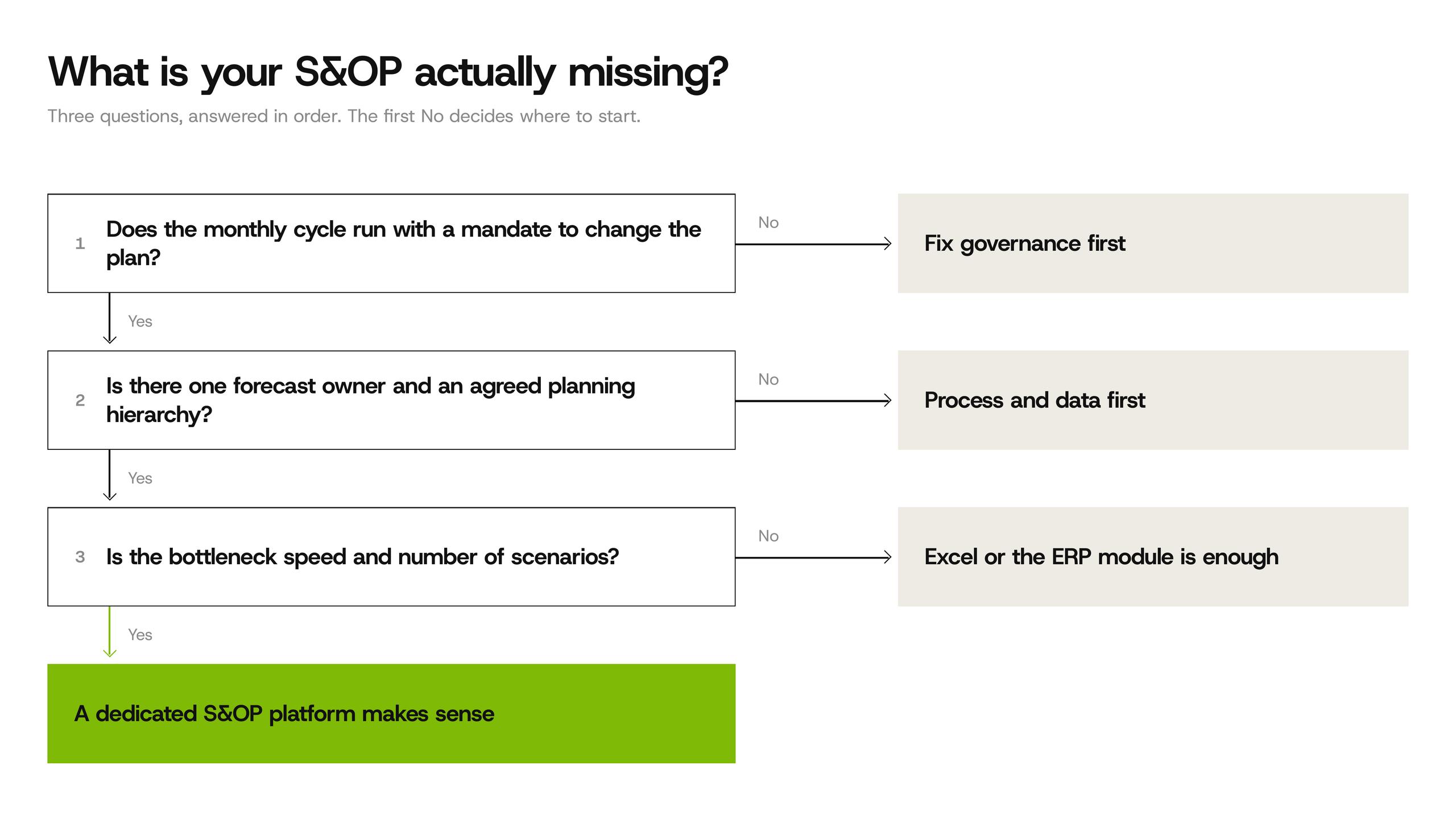
There is no correct tool in general, only a correct tool for the number of decisions you make and how often you need to remake them. Four questions do most of the sorting: how many planners and sites feed the plan, how many times a month you need to recalculate a scenario, how many capacity constraints you plan against (plants, lines, warehouses, key suppliers), and whether finance plans on the same horizon.
Excel is a legitimate answer for one plant, a few dozen product families and one planner who owns the file. It stops being enough at a point you can recognize without a benchmark: when two people edit the plan in the same week and nobody is sure which version went to the meeting, when preparing a second scenario takes longer than the meeting itself, or when you can no longer reconstruct why the plan changed three months ago.
The ERP planning module has the data advantage. Sales history, bills of materials and capacities are already there, so integration is short. The usual costs sit elsewhere: the module is administered by IT, changes to the planning hierarchy go through a ticket queue, and scenario work tends to be slow enough that planners export to Excel anyway.
A dedicated S&OP or IBP platform makes sense when the process is mature and the bottleneck is speed and the number of scenarios. Typical signs are several plants sharing capacity, frequent trade‑offs between service and cost that need to be quantified before the meeting, and a finance team ready to plan inside the same model.
If none of the three fits, the problem is usually not the tool. It is one of the four conditions from the previous section, and that is work on capacity planning, demand ownership or governance before any purchase.
What to check that a vendor demo won't show you
Every demo shows scenarios, dashboards and a clean hierarchy built on sample data. The questions below are the ones that decide whether the tool is still in use a year after go‑live.
How a scenario gets into the meeting. Not whether the tool can model a scenario, but how much work it takes to prepare three variants of next quarter by Monday morning, and whether a sales director can read them without a planner in the room.
How units become money. Where prices, margins and costs come from, who maintains them, and what happens when finance updates the price list in the middle of the cycle.
How decisions are recorded. Whether the tool keeps the assumption behind each change, so that in three months you can answer “why did we cut the plan for this family in May” without searching through email.
Where the baseline comes from. Some platforms forecast natively, others expect a feed from a specialized engine. Either can work. What matters is that you test the accuracy on your own history before you sign, and we describe how to set up that test in our guide on how to test forecasting software before you sign.
Who maintains the hierarchy after the implementation team leaves. New products, discontinued lines, a new warehouse. If every change needs the vendor, the model will drift away from the business within a year.
What it costs to run, not just to buy
The license is usually the smaller part of the cost. The larger part is the work around it, and it is the part that business cases for mid‑size companies most often leave out.
Someone has to run the cycle: prepare the reviews, chase inputs, keep the calendar and write down decisions. In companies where this is nobody's job, it quietly becomes the demand planner's second job, and the process degrades within a few months. Someone has to maintain the planning hierarchy and the mapping between SKUs and families. The integration with the ERP needs looking after every time the ERP changes. And new people in sales and finance need to learn how to read the plan, or they will keep asking for the Excel version.
For a CFO, the other side of the equation is what the process should deliver and how to measure it: fewer plan changes inside the frozen horizon, lower safety stock where plants or warehouses hand over material, fewer line changeovers caused by late plan changes, fewer emergency purchases. Each of these can be measured against the months before the change. If none of them is expected to move, the software is hard to justify at any price. We go through the cost side of build and buy decisions in more detail in the real cost of building it yourself.
How to test before you sign
For a forecasting engine, the right test is a backtest on your own history. For S&OP software, the equivalent is to run two monthly cycles in parallel: one the way you run it today, one in the tool you are evaluating, on the same data and with the same people.
Measure four things across both cycles: how many working days the preparation took, how many changes were made to the plan inside the frozen horizon, how many decisions were recorded with their assumption, and how many scenarios actually reached the executive meeting. The comparison tells you more than any feature list, and it tells you early whether the tool fits the way your people work.
The test is only valid if sales and finance take part, not just planning. If they do not show up to the test cycles, they will not show up to the real ones either, and the software will become a planning department tool with a planning department audience. A structured technology sourcing and selection process keeps the evaluation focused on these measures instead of on the most impressive demo.
When not to buy S&OP software
There are situations where the right decision is to wait, and saying so early saves months of implementation work.
The executive meeting has no mandate to change the plan. If the outcome of the meeting is decided elsewhere, or the plan is ignored the day after, fix governance first. Software will only document that the plan was ignored.
You are in the middle of an ERP or WMS go‑live. Master data, stock accuracy and the planning team's attention are all consumed by the migration. Starting a second planning project in parallel means both get half the attention. We described what breaks on the planning side during an ERP or WMS go‑live in a separate guide.
The real problem is replenishment, not reconciliation. If the pain is stockouts and overstock at SKU and location level, you need a replenishment and inventory optimization tool, not a monthly consensus process. The two are related, but they are bought, tested and implemented differently.
One plant, stable demand, a narrow range. A disciplined calendar and a well‑kept spreadsheet will serve you well, and the money is better spent on the forecast that feeds it.
Frequently asked questions
What is the difference between S&OP software and IBP software?
S&OP software supports the monthly cycle that reconciles demand, supply and capacity at the level of product families, usually over 12 to 24 months. IBP software extends the same model to the full financial plan and often to detailed supply planning. For most mid‑size companies, the S&OP layer is the one that is missing. IBP makes sense once the S&OP cycle is stable and finance is ready to plan inside the same model.
Can we run S&OP in Excel?
Yes, and many companies should, at least at the start. Excel works for one site, a limited number of product families and one owner of the file. It stops being enough when several people edit the plan in the same cycle, when preparing a second scenario takes longer than the meeting, or when you can no longer trace why the plan changed.
How long does it take to implement S&OP software?
It depends less on the software than on what is in place before it. With a stable cycle, one forecast owner and an agreed planning hierarchy, the implementation is mostly configuration and integration. Without them, most of the time goes into agreeing the hierarchy and the decision rights, and that work would be needed with any tool.
Do we need to fix our forecast before we start S&OP?
No. A monthly cycle can start with the forecast you have, and it is one of the fastest ways to find out where the forecast fails. What you do need is one person who owns it. Improving the statistical baseline is a parallel track, not a precondition.
Ready to find out what your S&OP is actually missing?
We can sit in on one of your planning cycles and tell you whether the gap is in the process, the data or the tool, before you spend on software. Talk to an expert.
More supply chain insights
Supply chain glossary
Product Portfolio Optimization
What product portfolio optimization is, how it differs from store assortment, and why each extra variant raises inventory even when sales stay flat.
19. october 2026
3 min
Supply chain glossary
Planogram
What a planogram is, what it specifies, and why its shelf capacity has to fit the delivery cycle and the case pack.
19. october 2026
3 min
Supply chain glossary
Long Tail
What the long tail of an assortment is, why it should be ranked per store cluster, and how pack sizes decide tail inventory.
18. october 2026
3 min