Whitepapers & ebooks
ERP and WMS Go‑Live: What Actually Breaks on the Planning Side
Vendor checklists cover the project. This covers the planning side: master data, stock accuracy, the frozen window and the forecast dip after cutover.
21. september 2026
13 min

Vendor checklists describe a go‑live from the vendor's side: configuration, testing, training, cutover. What they leave out is the planning side. Systems rarely break on switchover day. They break six weeks earlier, in master data, and six weeks later, in the habits of the people who are supposed to work in them.
A system laid on a crooked process does not fix it, it sets it in concrete
Buying a new WMS or ERP does not repair a process. It fixes the process in place, including the queues, the workarounds and the approval loop nobody can explain anymore.
Jan Buba, Senior Consultant and Interim Stream Lead at Logio, described the result in a trade piece for IT Systems this summer: “Processes get faster and more expensive, but stay exactly as inefficient as before, only harder to repair.” His conclusion from years of recovery projects is the sequence, not the technology: “Only once we straighten out the processes and the information flows does it make sense to talk about technology.”
That sequence is the whole argument of this text. Everything below is what “straighten out first” means in practice for a company that has already signed with a vendor and has a date in the contract.
If you are still deciding which system to buy, the prior question is whether the systems you already run are the constraint. That is a separate exercise: evaluating the systems you already have before you replace them.
What has to be true before you pick a go‑live date
Three things have to hold before a date means anything: the process on paper matches the process in the aisle, the master data behind that process is readable, and every field has a named owner.
The first one is the least obvious. Every company has a process described in its directives and a different one running in the warehouse, and the two often meet only in passing. Buba calls the fix data realism: processes leave digital traces in the systems you already run, and those traces can be assembled into a faithful picture of what actually happens. That picture tends to surprise management. It exposes bottlenecks in places everyone trusted, and approval loops that survived three reorganisations and lost their purpose somewhere along the way.
Do this before the specification is frozen, not after. A specification written against the paper process produces a system that automates a fiction, and the gap surfaces in week one of live operation, when there is no time left to redesign anything. The same logic applies to what you demand from the vendor: vendor readiness and system specification is where the paper process gets replaced by the real one.
Master data: the work nobody wants to own
Dimensions, weights, handling times and real supplier lead times decide whether the new system orders sensibly from day one. They are also the part of the project that nobody volunteers for.
The failure chain is short and expensive. One pallet has the wrong height in the master record. The system books an unsuitable truck for it. The truck arrives, does not fit, blocks the dock, the driver waits, and the penalty lands on your side. Nothing in that chain is a software defect.
What changes after automation is the error rate you can absorb. While a person placed the orders, that person caught most of their own mistakes before anything happened. Put an automated engine on top of broken data and the errors multiply at a volume nobody has the capacity to check. Buba puts it plainly: “An algorithm fed with a mess returns a mess, only faster and at a larger scale.”
Cleanup means going through the records the processes stand on, one by one: materials, suppliers, customers, price lists. Somewhere that means physically measuring hundreds of pallets, elsewhere unifying units, deleting duplicates, or calling suppliers to find out how long their lead time really is. No AI and no system vendor will do it for you.
The part most projects get wrong is what comes after. Master data is not a project, it is a regime. Every field needs an owner and a rule about who updates it and when. Without that, a company that cleans its data before go‑live is back where it started within two years, and the second cleanup costs the same as the first.
Stock record accuracy is a gate, not a nice‑to‑have
If your records and your shelves disagree today, a migration does not settle the argument. It carries the discrepancy into an environment where it is much harder to trace, because you can no longer tell whether a difference came from the old system, the migration itself, or the first weeks of live operation.
Treat accuracy as a condition for the date rather than a task inside it. That means a full count close enough to cutover that the numbers still mean something, a documented decision about how differences found in the first weeks get posted, and an agreement on who is allowed to correct a record once the new system is live. Companies that skip the last point end up with several people quietly fixing the same stock in different directions.
There is a sequencing detail worth insisting on: count before the freeze, not during it. A count that runs inside the frozen window competes for the same people who are supposed to be placing manual orders, and both jobs get done badly.
The frozen window: who orders while the system is switching
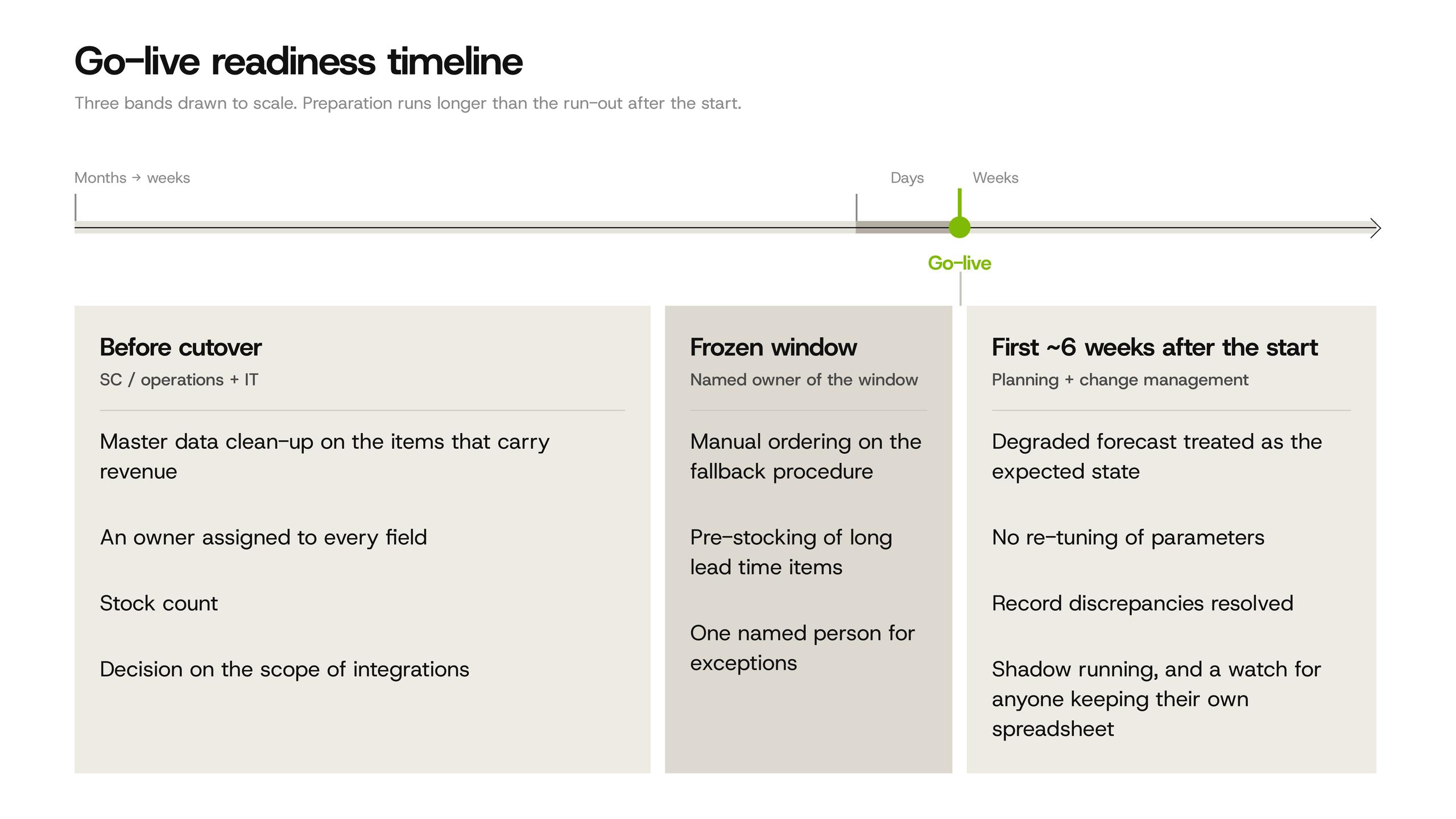
The frozen window is the period when the old system no longer decides and the new one does not yet. Somebody still has to order during it, and that is a planning decision, not an IT one.
Four questions need answers before the date is confirmed. How long is the window realistically, counting the days of reduced throughput after the switch, not just the technical downtime. Who places orders manually and with what authority. How far ahead the pre‑stocking horizon reaches for items with long lead times. Who decides on exceptions when a supplier calls with a problem that the fallback procedure did not anticipate.
Two categories deserve their own treatment. Long lead time items have to be covered beyond the window by a margin, because a missed order there is not recoverable inside the quarter. Promotions planned into the window should be moved if the calendar allows it; a promotion is precisely the situation where manual ordering has the least room for error and the highest cost of getting it wrong.
Why the forecast gets worse right after go‑live
Planning accuracy drops after a cutover. This is expected behaviour, not a defect, and teams that are not told in advance tend to respond in the worst possible way.
The mechanism is mundane. Sales history is interrupted at the switchover. The structure of the data changes, sometimes in ways that look cosmetic and are not: a different granularity of the sales record, a changed definition of a stock location, item and location codes that map old to new imperfectly. A forecasting engine reading that seam produces worse numbers for a while, and the more automatic your replenishment is, the more visible it becomes.
The response that makes it worse is re‑tuning parameters during the first weeks. Planners see bad suggestions, adjust safety stocks and service levels to compensate, and by the time the data settles the system is carrying a layer of manual corrections nobody can unwind. Keep the parallel history available, tell the planning team up front roughly how long the degraded period lasts, and leave the parameters alone until the seam is behind you.
This is also the point where an older argument of ours applies directly: better forecasting does not fix stockouts on its own, execution does. A cutover is an execution problem wearing a forecasting costume.
Two good systems that ignore each other
A solid WMS and a solid TMS with nothing between them are not double the value. They are double the investment returning a fraction of it, and the gap is filled by people retyping data.
Buba's example from a transport desk makes the size of it concrete. Before integration, a dispatcher copied shipment details from their own system into each carrier's portal, every portal with different fields and different logic. Whatever could not be clicked was chased by phone and email: calling for capacity, waiting for answers, chasing again, then typing the confirmed prices back. A single typo meant a wrongly booked collection and a round of corrections. One ordinary request could consume three quarters of an hour, most of it pure retyping between windows.
After the carriers were connected through APIs, the dispatcher does the same job: runs the tender, picks the carrier, negotiates terms. The retyping is gone. The request leaves from one interface, prices come back side by side, and shipment statuses move between systems on their own. Tens of minutes per request became single digits, and the same team handles a multiple of the work without adding a person.
The relevant question during a go‑live is which of these handovers you are planning to leave manual, and whether anyone has costed what that decision means per day. Integration work that gets cut from scope in month two tends to come back as a permanent headcount line. Scoping it properly is the job of integration and launch support.
The shadow Excel: how a go‑live quietly fails six weeks later
The dangerous failure is not the one on switchover day. It is the one that surfaces in week six, when the reports stop matching anything.
Here is how it happens. A dispatcher who has done the job their own way for years, and been good at it, hears “new system” and privately translates it as “they want to replace me.” Outwardly they click where they are told. At home in a drawer they keep running their old spreadsheet, because that is the only thing they trust. The official system then runs on incomplete data while the real truth lives in a private file, and the investment dies there without anybody reporting an incident.
Buba's reading of this is worth keeping: “Resistance to change is not ill will, it is a normal human reaction, and it can be worked with.” Three things work in practice. Involve operations people in designing the solution rather than presenting it finished, because whoever decided how their own screen should look will defend that screen in front of colleagues. Run shadow operations, old and new side by side, long enough for people to verify that the new one can be relied on. And make sure every dispatcher hears, and believes, that the job is not disappearing, it is changing: from retyping numbers between windows to managing exceptions.
The fourth thing is budgetary. Change management belongs in the budget and the schedule from day one, not as a soft add‑on to be cut when the hardware overruns. If that line is missing from your plan, it is not a plan for a go‑live, it is a plan for an installation. Implementation and change management is the part most often underfunded and most often responsible for the outcome.
There is a related design rule: “A system nobody can see into will not earn trust in operations.” If a user cannot find out why the system proposed what it proposed, they will keep their spreadsheet, and they will be right to.
When to postpone the go‑live
Three situations make a delay cheaper than a start.
Master data is not clean on the items that carry most of your turnover. Not all items, the ones that move. If the A items still have guessed weights or lead times nobody has verified, the first weeks of automated ordering will generate more work than the old process did.
The frozen window has no owner. If nobody can say who orders what during the switch and with what authority, you do not have a cutover plan, you have a date.
The date falls into your seasonal peak. Going live six weeks before the busiest period of the year means the learning curve and the peak land on the same people at the same time.
Delay is not free, and the argument on the other side deserves a hearing. Two systems in parallel cost real money in licences, maintenance and attention; a three‑month slip usually means losing implementation people who know your project; contractual milestones may carry penalties. The decision is a comparison of two costs, not a principle, and the honest version of it happens before the date is announced to the business, not two weeks before cutover.
Frequently asked questions
How long before go‑live should master data cleanup start?
Early enough that the result can be tested against the real process, which for a company with tens of thousands of active items means months rather than weeks. The useful test is not whether the cleanup is finished but whether the ownership rule works: if nobody can name who updates supplier lead times and when, the data degrades again before you go live.
Who should order during the frozen window?
The people who will own the process afterwards, using a written fallback procedure, with one named person authorised to decide exceptions. Handing the window to whoever is available is how companies discover in week three that nobody ordered a long lead time item.
How long does forecast accuracy stay degraded after a cutover?
Long enough to plan for rather than react to. The length depends on how cleanly old and new item codes map and how much sales history survives the migration. Leave planning parameters untouched until you have enough post‑cutover history to tell a data seam from a real demand change.
Should the old system stay available after go‑live, and for how long?
Read‑only access is worth keeping through the first closing cycle, because reconciliation questions arrive later than people expect. What should not stay available is the ability to transact in it. Two live systems mean two versions of the truth, which is the shadow Excel problem with an IT budget behind it.
Ready to pressure‑test your go‑live plan?
If you have a date in a contract and are not certain the planning side is ready for it, that is a reviewable question. We look at the same things every time: master data on the items that matter, stock record accuracy, the frozen window, the integration points you are planning to leave manual, and who owns the change on the floor.
We do this as an independent advisor rather than a system vendor, from selection through to live operation, as in this software selection and implementation project. We have been called in both before go‑lives and after them, and the second engagement is always the more expensive one.
More supply chain insights
Supply chain glossary
Phantom Inventory
Stock the system records as available while the shelf is empty: why replenishment stays silent and how to detect it.
21. september 2026
3 min
Supply chain glossary
Multi‑Echelon Inventory Optimization (MEIO)
Multi‑echelon inventory optimization sets stock levels across every stage of a supply network at once, instead of optimizing each location separately.
18. september 2026
3 min
Supply chain glossary
Vendor Managed Inventory (VMI)
An arrangement in which the supplier decides what and when to ship, based on stock and sales data the customer shares.
17. september 2026
3 min